

𝐀𝐝𝐦𝐢𝐧𝐢𝐬𝐭𝐫𝐚𝐭𝐨𝐫𝐬
- Jan
- 83
- 3
𝐃𝐄𝐕𝐄𝐋𝐎𝐏𝐄𝐑 & 𝐀𝐃𝐌𝐈𝐍
𝐅𝐨𝐮𝐧𝐝𝐞𝐫
𝐌𝐞𝐦𝐛𝐞𝐫
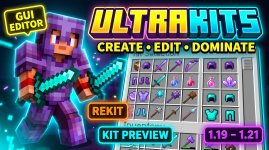
ULTRAKITS v1.0.1
Equip, Customise, Dominate and Conquer
Equip, Customise, Dominate and Conquer
UltraKits v1.0.1: Minecraft Kit Editor for KitPvP and Practice Servers
Quick answer: UltraKits is a modern Minecraft kit management plugin designed for KitPvP, Practice, FFA and competitive PvP servers. It gives server owners powerful tools to create, edit, preview, save and manage custom kits through an intuitive GUI system.
UltraKits v1.0.1 is included with this premade setup at no additional plugin charge. The standalone plugin is listed at $8.99 on BuiltByBit.
What Is UltraKits?
UltraKits is a flexible Minecraft kit editor and kit management plugin for servers that depend on custom loadouts.
Kit systems are important for KitPvP, Practice PvP, FFA, Crystal PvP and competitive duel servers. Players need a simple way to select equipment, while server owners need complete control over weapons, armor, items, enchantments and player-specific setups.
UltraKits brings these features together through a clean and modern interface.
The plugin is suitable for:
- Minecraft KitPvP servers
- Practice PvP networks
- FFA PvP servers
- Crystal PvP servers
- Spear PvP communities
- Mace PvP servers
- Custom weapon networks
- DonutSMP-style servers
- Training and combat servers
- Competitive Minecraft networks
UltraKits Included With the Setup
The main benefit of this offer is that UltraKits is included with the premade setup.
The standalone UltraKits plugin is listed at $8.99. Buyers of this setup receive the plugin without needing to purchase it separately for the same project.
This gives server owners access to a complete kit management system while saving configuration time and reducing the need for additional kit-related plugins.
Pricing note: Product prices, license terms and bundle contents can change. Confirm the current offer before publishing a final sales price.
Main UltraKits Features
UltraKits v1.0.1 includes features designed to make kit management easier for both server owners and players.
- Dual editor system
- Custom kit creation
- Player-specific kits
- ReKit system
- Kit effects support
- Kit preview feature
- Modern GUI editor
- Intuitive commands
- Fully customizable messages
- JSON saving system
- Asynchronous operations
- Smart caching system
- Hex color support
- Flexible kit management
- Practice and KitPvP compatibility
Dual Editor System
The dual editor system gives server owners more flexibility when managing kits.
Different editing workflows can be used for different server requirements. Owners can create a kit from the beginning, modify an existing loadout or adjust individual items without rebuilding the entire kit.
This is useful for networks that offer many combat modes and need to update kits regularly.
The dual editor system can help with:
- Creating new PvP kits
- Editing existing kits
- Balancing weapons and armor
- Updating enchantments
- Changing inventory layouts
- Preparing seasonal kits
- Managing event loadouts
Custom Kit Creation
UltraKits allows server owners to create custom kits for different gameplay styles.
A kit can include weapons, armor, blocks, food, potions, projectiles, utility items and enchantments. This allows every game mode to have its own balanced loadout.
Custom kits are useful for:
- Classic PvP
- Crystal PvP
- Netherite PvP
- Sword PvP
- Axe PvP
- Mace PvP
- Spear PvP
- Shield PvP
- NoDebuff
- Combo PvP
- Sumo
- Boxing
- Custom weapon practice
The exact items and modes depend on your server configuration.
Player-Specific Kits
Player-specific kits allow server owners to create customized loadouts for individual players or groups.
This feature can be useful for:
- Staff kits
- Donor kits
- Tournament kits
- Event kits
- Practice training kits
- Private player loadouts
- Rank-based equipment
- Special reward kits
Player-specific kits can make a server more flexible because different players or roles can receive different equipment without changing the entire global kit system.
ReKit System
The ReKit system makes it easier to reset or restore a player's selected kit.
This can be useful after a fight, during repeated practice matches or when players need to return to their preferred loadout quickly.
A ReKit feature is especially helpful for:
- Practice PvP servers
- FFA arenas
- KitPvP gameplay
- Training matches
- Mace PvP practice
- Spear PvP practice
- Crystal PvP battles
It reduces unnecessary inventory work and helps players return to combat faster.
Kit Preview Feature
The kit preview feature allows players to inspect a loadout before selecting it.
Players can view the contents of a kit, including weapons, armor, consumables and other items. This makes it easier for new players to understand the differences between available kits.
Kit previews are useful when a server offers:
- Many PvP kits
- Ranked and unranked modes
- Different weapon categories
- Custom event loadouts
- Spear and mace kits
- Crystal PvP kits
- Donor and premium kits
A clear preview system also improves the first-time player experience.
Kit Effects and Cosmetic Customization
UltraKits supports kit effects and can be used with cosmetic-focused server designs.
Kit effects can make certain loadouts feel more unique and can be connected to rewards, ranks, achievements or special events.
Server owners can use kit effects for:
- Premium kits
- Donor ranks
- Tournament rewards
- Seasonal kits
- Event loadouts
- Achievement unlocks
- Special PvP modes
This gives players more reasons to explore different kits and continue progressing on the server.
JSON Saving System
UltraKits uses a JSON saving system for kit data.
A structured saving system helps organize kit information and makes it easier for the plugin to store detailed loadouts. This is useful for kits containing many items, enchantments and customized settings.
Kit data may include:
- Inventory items
- Armor contents
- Enchants
- Potions
- Kit effects
- Custom names
- Item settings
- Player-specific values
Server owners should always create backups before making major configuration changes.
Performance and Smart Caching
UltraKits is designed with performance in mind.
The plugin uses asynchronous operations and a smart caching system to help process kit data efficiently. This is valuable for servers where many players are opening menus, previewing kits or changing loadouts at the same time.
Performance-focused kit management is useful for:
- Large KitPvP servers
- Busy Practice networks
- FFA servers
- Competitive PvP communities
- Servers with many custom kits
- Networks with frequent kit updates
Actual performance depends on server hardware, player count and other installed plugins.
Custom Messages and Hex Colors
UltraKits allows server owners to customize messages and use modern color formatting.
Hex colors can help match kit menus, messages and chat text with your server branding.
You can customize messages for:
- Kit creation
- Kit selection
- Kit editing
- Kit preview
- Kit saving
- Kit loading
- Permission errors
- Admin commands
- Player notifications
Custom messages make the plugin feel more connected to your server instead of looking like a default installation.
UltraKits for Spear PvP and Mace PvP
Modern Minecraft PvP servers are increasingly adding spear PvP, mace PvP and custom weapon practice.
UltraKits can help organize these combat styles by giving each weapon type its own kit.
Possible kit categories include:
- Spear PvP kits
- Mace PvP kits
- Spear and shield kits
- Mace training kits
- Custom weapon kits
- Spear versus mace kits
- Crystal and spear hybrid kits
- Netherite weapon kits
Server owners can also use kit previews and player-specific kits to make advanced weapon modes easier to understand.
Dedicated spear or mace mechanics depend on the plugins and configuration installed on your server.
Supported Software and Versions
The current UltraKits listing advertises support for Bukkit and Paper servers.
The listed Minecraft versions include:
- Minecraft 1.21
- Minecraft 1.20
- Minecraft 1.19
The plugin is categorized for KitPvP and Practice gameplay.
Always check the latest BuiltByBit page before installing UltraKits on a production server, especially when using a newer Minecraft version.
How to Use UltraKits in Your Server Setup
- Download UltraKits from the official BuiltByBit resource page.
- Place the plugin file in your server's plugins folder.
- Start or restart the server to generate the configuration files.
- Create your first kit using the editor system.
- Add weapons, armor, items and enchantments.
- Configure kit permissions and player access.
- Preview the kit before publishing it.
- Test the ReKit system in a practice arena.
- Customize messages and colors.
- Create backups before making major changes.
For best results, test every kit with real players before launching a new PvP mode publicly.
Why Use a Ready-Made Kit Management System?
Creating and maintaining kits manually can become difficult as a server grows.
A dedicated kit editor gives server owners a central place to manage loadouts, while players receive a simpler way to preview and select equipment.
UltraKits can help you:
- Save kit configuration time
- Create more balanced loadouts
- Manage many PvP kits
- Improve the player interface
- Support custom weapon modes
- Organize donor and event kits
- Reduce repetitive inventory work
- Create a more professional server experience
Who Should Use UltraKits?
UltraKits is suitable for:
- Minecraft KitPvP owners
- Practice PvP networks
- FFA server owners
- Crystal PvP communities
- Spear PvP servers
- Mace PvP networks
- Custom weapon communities
- DonutSMP-style servers
- Competitive Minecraft networks
- Servers with many custom loadouts
It is especially useful for servers that frequently create, update and rebalance kits.
Frequently Asked Questions
What is UltraKits?
UltraKits is a Minecraft kit management and kit editor plugin for KitPvP, Practice, FFA and competitive PvP servers.
How much does UltraKits cost?
The current BuiltByBit listing shows UltraKits at $8.99. Prices and license terms may change over time.
Is UltraKits included with the setup?
Yes. According to the setup offer, UltraKits v1.0.1 is included at no additional plugin charge.
What servers can use UltraKits?
UltraKits is suitable for KitPvP, Practice PvP, FFA, Crystal PvP, custom weapon and competitive Minecraft servers.
Does UltraKits have a GUI editor?
Yes. The plugin includes a modern GUI editor for creating, editing, previewing and managing kits.
Does UltraKits support kit previews?
Yes. Players can preview kits before selecting or using them.
Does UltraKits support player-specific kits?
Yes. The plugin includes player-specific kit management for custom loadouts, ranks, staff, events and special rewards.
What is the ReKit system?
The ReKit system helps players restore or receive their selected loadout again without manually rebuilding their inventory.
Does UltraKits support JSON saving?
Yes. UltraKits includes a JSON saving system for organizing kit data and customized loadouts.
Does UltraKits support asynchronous processing?
The product presentation promotes asynchronous operations and smart caching for more efficient kit processing.
Which Minecraft versions are supported?
The current listing advertises Minecraft 1.19, 1.20 and 1.21 support with Bukkit and Paper compatibility.
Can UltraKits be used for spear PvP and mace PvP?
Yes. UltraKits can be used to create and manage spear PvP, mace PvP and custom weapon kits. Exact combat mechanics depend on the other plugins installed on your server.
Useful Links
Final Verdict
UltraKits v1.0.1 is a flexible Minecraft kit editor and kit management plugin for servers that want better control over their PvP loadouts.
With a dual editor system, custom kit creation, player-specific kits, ReKit support, kit previews, kit effects, JSON saving, asynchronous processing, smart caching and customizable messages, UltraKits gives server owners the tools needed to build a professional KitPvP or Practice experience.
The plugin is also useful for crystal PvP, spear PvP, mace PvP, FFA, custom weapon and competitive Minecraft networks.
Ready to improve your Minecraft kit system?
Get UltraKits on BuiltByBit
Minecraft is a trademark of Mojang Studios. This article is not affiliated with or endorsed by Mojang Studios.